Students

Students

An EFB That Helps You Learn to Fly

Spend your mental energy flying the airplane, not figuring out your navigation app.

Flight training already gives you plenty to think about. iFly EFB makes flight planning and navigation intuitive, giving student pilots the information they need without burying it behind a complicated workflow.

Easy to learn. Easy to use.

Safety-first features, including emergency mode

Traffic and weather on the map for better situational awareness

Easy flight planning and navlog creation, VFR and IFR

Review your flight data and performance during and after the flight

Log your flights in MyFlightBook

Runs on Android, Apple, and Windows. Already have an Android tablet? You can avoid the switch to iOS.
Student pilot during flight training

Learn Aviation, Not Software.

Your EFB should support the skills your instructor is teaching, not compete for your attention. iFly is built first as a navigation tool, with a straightforward interface that makes the information you need easy to find before and during the flight.

“I feel it is generally easier to learn than ForeFlight is initially. I like the ability to customize many aspects of the setup and prioritize what I see on the screen. The simpler and more intuitive the better for beginner students.”

Will E., CFII

Fly the Plan

Plan your route, understand the airspace and weather, then follow that plan in the airplane. iFly keeps the workflow simple so your attention stays where it belongs, on flying.

Grow From VFR to IFR

Start with sectional charts, airports, weather, and cross-country planning. When you move into instrument training, iFly is ready with IFR charts, procedures, plates, flight filing, and advanced planning tools.

Use the Hardware You Have

You shouldn't need to buy a new tablet just because you started flight training. iFly runs on iOS, Android, and Windows, so you can choose the device that works for you.

“I have an Android Samsung A13 and was using Garmin Pilot. They pushed a large update which my phone could not handle, rendering their app useless… After checking around I found iFly and found it to have just enough features, but not overly, to be very convenient for me. I love that it doesn't overtax my phone and is simple to navigate.”

Bob T., CFI

A Student Price for a Complete EFB

iFly gives you a complete EFB from the beginning. Learn on the same platform you can continue using after your private pilot checkride, through instrument training, and beyond.

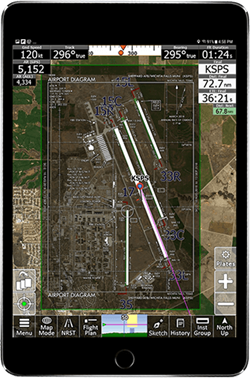
iFly EFB airport navigation display

Navigation & Airport Awareness

See your aircraft, route, airport environment, and the information you need to maintain situational awareness throughout the flight.
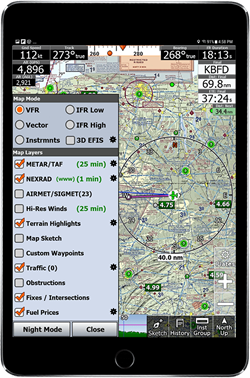
iFly EFB charts weather and map layers

Charts, Weather & Airspace

Bring charts, weather, terrain, airspace, traffic, obstacles, fuel prices, and navigation information together on one familiar map.
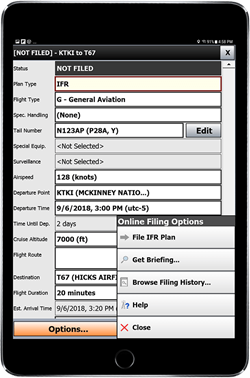
iFly EFB flight planning and filing

Flight Planning & Filing

Build and modify routes, review your plan, get a briefing, and file when you're ready, all from the same EFB.

What You Learn With It

iFly does not do the thinking for you. It puts the real information in front of you so you can practice the skills your checkride will test.

Weather

Read the Code, Then Check Yourself

METARs and TAFs appear as the raw text pilots read, with a decoded breakdown alongside. Practice reading the code, confirm what you got, and pull a full briefing from inside the app before every flight. Radar, satellite, and winds aloft sit on the same map as your route.

Airports

Brief Any Airport Before You Go

Frequencies, runways, the Chart Supplement entry, airport diagrams, FBOs and fuel prices, and RealView airport images. Everything you would look up by hand, on one page per airport.

Cross-Country

Check Your Math

Plan the flight by hand, then compare. iFly builds the navlog for you, with each leg's heading, time, and fuel from an aircraft profile you set up for the airplane you fly, and a weight and balance profile keeps you honest on loading.

Airspace & Terrain

See the Route From the Side

Profile view shows your route against terrain, obstacles, and airspace floors and ceilings. Terrain alerts and synthetic vision are in the base subscription, not a paid add-on.

In Flight

Safety First, Without Clutter

Distance rings, a glide range ring for the engine-out question, an instrument panel with the next waypoint and destination, ADS-B traffic when you connect a receiver, and audible terrain and traffic alerts. If something goes wrong, emergency mode puts the nearest airports and the 7700 checklist one tap away.

Instrument Rating

Plates on the Map, Plans Filed From the App

Georeferenced approach plates and airport diagrams overlay the moving map. File IFR flight plans from the app and learn to amend, activate, and close them the way you will after the checkride.

“For teaching IFR approaches, the visualization feature in flight planning really helps students understand what is going on in the different IFR approaches… iFly also has multiple ways of keeping you out of airspace you shouldn't be in.”

Rich L., CFI

Replaying a recorded flight trail in iFly EFB

After the Flight

Watch the Lesson Again

iFly records a trail for every flight. Replay it on the ground, at real speed or faster, and see your pattern, your hold, or your descent the way your instructor saw it. It is the fastest way to turn a debrief into a fix.

Between lessons, connect iFly to X-Plane or Microsoft Flight Simulator at home and practice the cross-country or the approach with the same screen you will have in the air.

One EFB Throughout Your Training

Flight training is about repetition and building good habits. Instead of learning one tool for primary training and another when you begin IFR, you can build familiarity with iFly from your first cross-country onward.

Your interface, flight-planning workflow, aircraft profiles, charts, and navigation tools stay familiar as your skills and missions become more advanced. When you graduate, you keep the same app.

Track Your Progress to the Checkride

iFly exports your recorded flight trails to MyFlightBook, a free cloud logbook with web, iOS, and Android apps. It tracks totals and currency, shows your progress toward the private pilot and instrument requirements, and lets your instructor sign entries and issue endorsements.

You and your CFI both pay nothing for it.

Video Series

iFly EFB for Student Pilots

Four short videos that take you from “what is an EFB” to a briefed and filed cross-country. Watch them in order, or jump to the part your instructor assigned.

Part 1: What Is an EFB?

What an electronic flight bag does for a student pilot and where iFly fits in your training.

Part 2: Initial Setup and Where to Find Information

First-time setup, then a tour of where airports, weather, charts, and settings live in the app.

Part 3: Aircraft Profile, Flight Planning, and Waypoints

Set up the airplane you fly, build a route, and pick the checkpoints for your cross-country.

Part 4: Flight Briefing and Filing Flight Plans

Get a briefing inside the app, then file, amend, and close a flight plan the way you will after the checkride.

Focus on Learning to Fly, We Teach You iFly.

Whether you prefer watching videos, reading, asking questions, or figuring things out hands-on, help is available when you need it.

Student Video Series

Short, bite-size videos made for student pilots. Learn the parts of the app you will actually use as you work toward your certificate, in a few minutes at a time.

Watch the Series

Pilot's Guide

Our complete Pilot's Guide walks through the app, planning, charts, weather, procedures, alerts, and advanced features.

View the Guide

Pilot Community

Ask questions, exchange ideas, and learn from other iFly pilots through the Adventure Pilot community.

Visit the Forum

Phone Support

Stuck on something? Call (214) 585-0444, weekdays 10 to 5 Central, and talk to a person who works with pilots every day. Email and online help are there too.

Get Help

10% Off for Student Pilots

Flight training is expensive enough. Student pilots enrolled in training get the full iFly EFB subscription for $85.49 for their first year instead of $94.99. Over the 40 flight hours it takes to earn a private certificate, that is about $2 per hour for the cheapest thing in the airplane.

And if you already own an Android tablet, you do not need to spend $500 on an iPad to run iFly EFB. That is three more hours in the airplane, and three hours closer to your rating.

How It Works

1. Start the free trial on your own device.

2. Create your Adventure Pilot account.

3. Submit the student offer form.

4. We confirm your training status and apply the 10% first-year discount.

Student Offer Form

Training at a flight school? Your school may already have a program account.

Start Learning With iFly EFB

Use the device you already own, take iFly through your flight training, and spend more time learning to be a pilot.

Start Your Free Trial Get Student Pricing